7 Critical Website Tips That Will Help Your Business

Some of our website tips are not by any means new; they are just applied to the world’s new way of finding information – websites. Following these simple tips will ensure that people find your website. Once there, they should be encouraged to contact you so you acquire a lead.

Website tips that can help your business

  1. Make Your Website Mobile Friendly (Responsive) – Mobile and tablet usage have surpassed that of desktop, so it’s no surprise that Google and other search engines have modified their algorithms to accommodate this. They are now penalizing you by ranking your site lower than those who have met the mobile standards. A responsive website instinctively resizes itself across multiple viewing devices (from desktop monitors to mobile phones) – no pinching or horizontal scrolling required.
  2. Use Common Words Instead of Industry Jargon – “Too much of a good thing” is a saying we often hear in the world of web design, and the same goes for your content. Some people make the mistake of talking to their audience as if they are experts as well – many times this causes a disconnect. You can’t expect your audience to know all of your technical terms and the lingo of your industry. Write your content on a level that most can understand in order to keep your readers interested. Have someone else proof it and get their opinion.
  3. Optimize Your Website for a Quick Load Time – Do you ever go to a website and give up because it takes too long to load? Unfortunately this is all too common with today’s websites. As we continue to add new ways to engage our audience with moving imagery and fancy content, we can forget the time computers take to load all the assets the website requires. Having a slow website not only discourages your anxious guests, but search engines have added your load time as one of the deciding factors in how high you rank. It’s important that you take load time into consideration. The shorter the load time, the better chances you have of connecting with your audience and being on the first search results page.
  4. Have Clear Calls-to-Action – I once read that you need to tell your audience plainly what you want them to do. Whether it’s to place a phone call to make an appointment, fill out a form or join an e-newsletter group, calls-to-actions help guide your visitor about what to do next. Without these buttons you lose opportunities to capture new leads. Obvious call-to-action buttons and features on your website, with Google Analytics tracking code, will help you and your audience.
  5. Write Relevant Content – When visitors come to your website, they are there for a reason, whether it’s for information about one of your services, help with a problem or an inquiry about a product. Your website should satisfy their question. Write as if you are talking to someone for the first time and answer all of the questions they typically ask. I’m sure you’ve had a conversation with a prospect and know what people inquire about, so you already have a good grasp of what should go on your website. There is a balance between general information, qualifying information, and information that someone really needs to contact you about.
  6. Show Essential Business Information – Visitors to your website also look for your business information. They want to easily access information like your
    • Address, and if you have a brick and mortar store, a link to a map
    • Phone number and email address
    • Social media links
    • Hours and an “about us” page
    • Pricing and how it works

    You’d be surprised how many businesses don’t have this obvious information in an easy place for people to find. If you’re like me, you may tend to stay away from those businesses over security or other legitimate concerns.

  7. Stay Current – More and more, people judge you by your website. Websites with current information, well maintained and contemporary in design, build trust and credibility for your business. That doesn’t mean you need to update your website every month. But if it’s been years since you’ve had a major website overhaul, it’s probably time to change to something more present-day.

If you haven’t looked at your website for some time, take a new look with fresh, discerning eyes. Compare your website to your competitors’ websites. Are there any features that you should add? Is there a better way to point out your advantages over theirs?

If your website is out of date or suffers from one of the flaws mentioned previously, the VIA Marketing team will be happy to help. Contact Julie or call 219-769-2299 to see where to begin.

How to Protect Your Images and Content

With the growth of the internet, image theft and copyright violations have become one of the biggest issues facing website owners. Now with the addition of sites like Pinterest, Flicker, and even Google Images, it is almost impossible to stop your images from being stolen. Is there anything you can do? While a website owner cannot achieve 100% safety, there are steps you can take to protect your brand and your media.

Disabling Right-Click

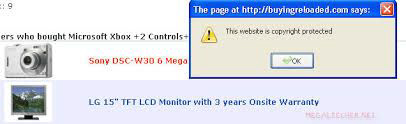
Website images are stolen by right-clicking. Thieves easily right-click on the image and paste it to their desktop. With the advancement of technology, there are now ways to prevent someone from utilizing this method. Using a simple line of JavaScript code completely disables right-clicking on your website. Although this may seem like a sure way, this only stops a non-tech user. To get around this, a tech-skilled user will just disable JavaScript on their browser, and right-click will work again.

Protect content by disabling right-click

Adding a Copyright Notice/Disclaimer

Although this sounds simple, it’s been shown that adding a copyright notice and disclaimer prevents some people from taking images from your website.

Watermarking

This may not be applicable to all website images, but watermarking helps to stop people from taking images, especially on portfolio websites. You can also accompany a watermark with a notice of usage that urges people to contact the owner for details of the rights of use. This stops a lot of non-tech users, but people with strong skills in any photo-editing software can remove your watermark.

Protect content by placing watermark

DMCA Badge

The Digital Millennium Copyright Act Services Ltd. (DMCA) offers free protection for your website, which includes a takedown notice. They also offer a free image watermarking service. Putting a DMCA badge on your site acts as a deterrent for serial image stealers, and DMCA will threaten legal action on your behalf, which usually scares infringers into removing your stolen content right away.

Protect content by placing DMCA badge

In conclusion, there is no surefire way to protect your media from being stolen, but by using one or more of the above methods, you can deter people from taking your images. Pick a method that works best for you. If you have a portfolio-based website, watermarking is the simplest method. Most artists and photographers have their own watermark for professionalism. If you’re a larger company and own a website, a copyright disclaimer and DMCA badge will show your authority. No matter the methods, ensure that you approach and implement them correctly.

If you are concerned about your website’s security, the team at VIA Marketing is here to help. Call or email Julie at VIA to see where to begin.


Why Page Speed is Important to You

We live in an age of technology where everything is getting faster by the minute. One would expect the same of all the websites in existence, but there are still over 10 million websites that are penalized by search engines each year due to bad performance and speed issues.

How does the speed of your website impact you and your business? Speed plays a major role in two aspects of your website: user engagement and search engine optimization.

Just last year, Amazon announced that for every one-second delay on their site, conversions dropped by 7 percent. That means if Amazon has $100k in sales per day, they would see an annual loss of $2.5 million. On the flip side, Wal-Mart reported that for every 100 millisecond increase in page load time, they saw a revenue increase of 1 percent.

E-Commerce sites only make up roughly 12 percent of the market, so while user engagement is a key factor in page speed optimization, all websites are affected by Google’s SEO rankings based on page load times. Back in 2010, Google announced they would be implementing a speed variable into their logarithm, so if your site isn’t optimized for speed and performance, it will in turn hurt your Google ranking. The idea behind this is to provide people using search engines with the best possible sites and the best experience, proving once again, faster is better.

What Defines Page Load Times

Page load times are defined as the time it takes your website to load all the necessary files to display the content to your user. Even the simplest looking websites are ranked poorly if the site assets aren’t optimized for fast performance. While there are dozens of items that impact your site’s performance, usually only a handful cause the most problems and they can be easily fixed:

  • Image Optimization. Sizing images correctly to fit the display they are being used in, rather than using large images and scaling them down.
  • Minify Javascript/CSS. Reducing the code structure by writing cleaner and shorter code for items such as slideshows and hover/rollover effects.
  • Leverage Browser Caching. Setting expiration dates for images and files on your website so the user’s browser doesn’t have to get a new version every time they visit the webpage.
  • G-Zip Compression. Auto-enabling your server to compress files may reduce the page size by up to 70 percent.

There are many other factors that play a role when it comes to page speed and load times on your website. The few listed above are the easiest to adjust to help move your score up. Other factors take a bit more knowledge and time.

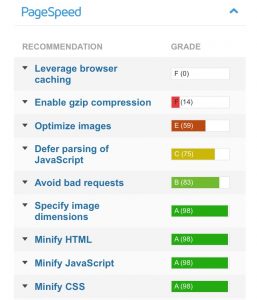
GTMetrix can give you in-depth metrics regarding your website's page speed.

Where do I Find my Website’s Metrics?

If you want to know how your website ranks, there are many tools that will help diagnose your page speed metrics. No one diagnostic website will give a clear-cut list of everything wrong. Instead, most will give you suggestions and recommendations about what is slowing your website down and how to address the problems. Google has its own page speed tool, called Page Speed Insights. There are other tools out there, such as GTMetrix that provide a more in-depth and technical set of information. These tools, though beneficial, can be a bit overwhelming if you are not familiar with basic programming languages.

If you are concerned about your website’s page speed and how it’s affecting your rankings, the team at VIA Marketing is here to optimize your site in order to move you up in the rankings. Call or email Julie at VIA to see where to begin.