People Love Watching Facebook Video

Capturing and keeping your audience’s attention is key when planning any type of marketing campaign. That is even more important when you compete for interest on Facebook.

Recently we’ve seen a huge engagement shift on Facebook from photo to video. Why? The answer is simple: organic reach. Recent data shows that video posts receive 135 percent greater organic reach than photo posts, using the same URL and post description. Facebook defines organic reach as the total number of unique people who were shown your post through unpaid distribution.

Adding Facebook video, with the ability to share to millions of others in an instant, could make a significant contribution to your marketing strategy. Last year Facebook averaged 8 billion videos viewed per day and the trend is still growing. Yet many marketers think only about YouTube for video posts.

Video’s main factors that keep your audience engaged are autoplay, subtitles, mute, and video playback while scrolling.

Here are some simple tips to remember when you are ready to post video ads on Facebook.

  1. Upload Directly to Facebook
    Many people think if they upload their video to YouTube and then post the link on their Facebook account, they achieve two forms of marketing at the same time. While at first glance that might seem like a good thing, the statistics tell another story. Quintly, a social media analytics agency, found that Facebook native videos get four times higher interactions than linked YouTube videos.Facebook Video Preview

  2. Follow Russell Crowe’s Query “Are You Not Entertained?”
    Most people will give a video four seconds before deciding to keep watching or leave. After 30 seconds, 90 percent of your target audience will leave, according to Vidyard, a video analytical reporting agency. Those initial four seconds are the most crucial. It’s important to create a shock and awe factor to maximize the potential of your video in those first seconds. Leave an impact right away, get your message across quickly and try to be memorable. Many videos are under 30 seconds due to those attention factors.
  3. Create a Call-to-Action
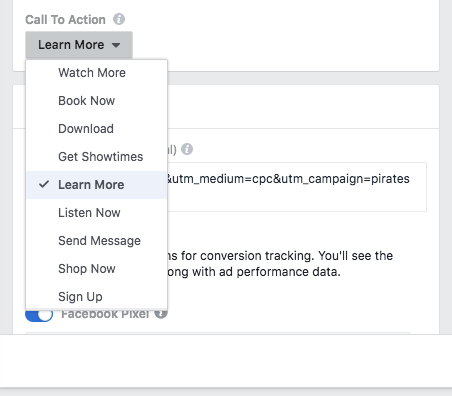
    When you post your video and just before you hit “publish,” take a look at the list of actions you may want to add. Facebook allows you to add a URL, tag a person, add an emoji, check-in to set the location, allow a reply in Messenger, support a non-profit with a donate button, and tag a product. Create an easy opportunity for someone to take the next step to connect with you.Facebook Video Calls to Action
  4. Stream with Facebook Live
    Facebook Live video streaming has become the new “IT” thing in regard to engaging your audience and connecting. Facebook Live is a 3-phase marketing event that works to increase awareness.

    • Pre-Event. Promotes your Facebook Live event to build up an audience, to set reminders, and even create a countdown.
    • Real Time Broadcast. Introduces you and engages your audience. What makes Facebook Live unique is that it streams in real time. Your audience can talk to you through the chat, and you have the opportunity to address them in real time. Be sure to end your broadcast with a call to action (CTA).
    • Post-Event. Captures people who didn’t have a chance to watch your event live. You can edit your video, include a thumbnail, give it a description, and post it as a normal video on your timeline.
  5. Use Video on Your Facebook Page/Profile
    Facebook now allows you to use video as not only the header, but your profile picture! While that is pretty exciting, it’s more for visuals. If you want to promote a new service, product or event, using “Featured Video” helps drive traffic to your video and by proxy the CTA. Set it up in the section on the left side of your page, and “pin” a video of your choice.

With any marketing campaign, the quality of the message is just as important as the means of delivery. Quality scriptwriting, video editing, and post production play a large role in ensuring that your message isn’t being lost in a choppy video or bad visual quality.
VIA recently won a nice award for the video we did for Bosak Motors. We know videos are an investment that needs to pay off with audience engagement. Call on VIA professionals to help you get noticed in a way that says you are a superior organization worth watching.

How Will the New SSL Certificate Policy Affect My Website?

SSL Certificate Warning

What is an SSL Certificate?

SSL (Secure Sockets Layer) is the standard security technology for establishing an encrypted link between a web server and a browser. Encryption is what makes the link secure. If you collect sensitive information like a credit card, most likely you already have an SSL Certificate.

To identity web pages with an SSL Certificate, look for their URL to start with (1) “https://”, (2) a little icon of a lock, or (3) a green address bar. These sites use encryption technology that secures your information as it moves from server to server through cyberspace. HTTP stands for hypertext transfer protocol and the added “S” stands for secure.

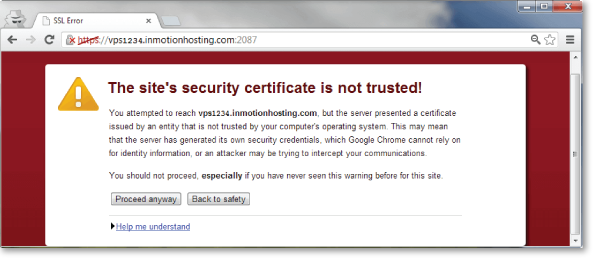
Google is now asking that you not only have SSL security on your pages with credit card and password forms, but they also want it to be on ALL pages that contain forms, even simple ones and search bars. When a user begins filling out any of the fields, a warning will appear in the address bar.

SSL Certificate Error
Why does Google Chrome 62 want them on all forms?

According to a recent Forbes article, “from 2013 to 2015 the cyber crime costs quadrupled, and it looks like there will be another quadrupling from 2015 to 2019. Juniper Research recently predicted that the rapid digitization of consumers’ lives and enterprise records will increase the cost of data breaches to $2.1 trillion globally by 2019, increasing to almost four times the estimated cost of breaches in 2015.”

These criminals are smart and motivated, plus Google’s research shows people do not think about the lack of security when they complete forms. Google wants to clearly label unsecure web pages in order to help protect our personal information from hackers.

The process of identifying pages as not secure is a gradual one that started with the release of Chrome version 56 and now a larger standard with Chrome 62. Google intends to continue this initiative and in the future will flag all websites as unsafe unless they have the SSL Certificate. Your Chrome browser will automatically update to 62 unless you have it set to manual.

What does this mean for your website?

Google views security as such an important issue that they use it as one of their search engine ranking factors. Your secure website has a good chance of ranking higher than a non-secure website when someone is searching one of your keywords. One of the biggest reasons to make the switch now is to stay ahead of the curve and maintain or improve your Google ranking.

Approximately 50 percent of people on the Internet use Google Chrome as their browser. This presents another compelling reason. You don’t want to discourage a prospect or customer with a “not secure” pop-up warning.

The best approach for purchasing and adding a secure certificate is to talk with a professional. There’s a lot that goes into switching your website pages, and you don’t want to miss any important steps. An SSL Certificate costs about $60-$70 per year through GoDaddy.

To learn more about your situation, please contact julie@viamarketing.net or call 219-769-2299 and we will investigate and recommend updates to keep you on the cutting edge – or at least running without error messages.

Stay Current with PHP Upgrades

We asked Ryan, our web developer, to explain why PHP upgrades are important for websites. As your bonus, I will once again attempt to translate his answers into common English so we can all understand what is meant. Refer to VIA Idea #44 to see my last translation.

VIA Idea #51: Stay Current with PHP Upgrades

  1. Michelle: Starting with the basics, what is PHP?
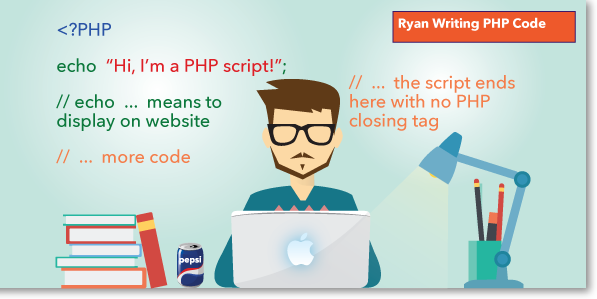
    Ryan: PHP is a server-side scripting language designed primarily for web development but also used as a general-purpose programming language. PHP originally stood for Personal Home Page but it now stands for the recursive acronym Hypertext Preprocessor. All that means is PHP code can be inserted into the HTML of a Web page.Did you know that as of January 2017, there are over 935 million websites in play on the World Wide Web, and 82.6 percent use a version of PHP? The most-used and supported version is PHP 5.0; these make up 92.3 percent of websites created with PHP code.
    Translation: Website developers really, really like PHP and use it all the time. A “supported software version” means that if a problem occurs, software developers are actively investigating the issue and sending you update patches with the fixes.
  2. Michelle: I’m wondering what other programming languages are out there.
    Ryan: There are dozens out there, some that are well known, such as HTML, ASP and JavaScript. At the other end of the spectrum, there are languages that are rarely used such as Intercal and Whitespace.
    The thing to remember is that even though websites are built in PHP, it doesn’t mean other languages are not used as well. PHP is a server-side script, meaning it runs functions and scripts on your host server before it renders the front end of the website that your visitors will see. PHP works well with other languages such as HTML, CSS, JavaScript and dozens of others to create very powerful websites and applications.
    My Comments: I’m sorry I asked…not sure it matters to our topic of keeping website PHP code updated.
  3. Michelle: Getting back on track: why are there so many versions of PHP?Ryan: People like me work to help grow technology with field advancements in languages such as PHP to bring forth updates and new versions. The most recent version of PHP is v7. Since it is still so new, only 5.5 percent of PHP servers are running it. PHP v5 is still the most-utilized version. Older versions like 5.2x still exist and are used by some web applications, but we are starting to see problems as we move forward with new servers and recent software updates.I skipped PHP v6 because it collapsed in 2010. It’s important to realize that even though it failed, it spawned the intl extension and other features that are now part of the language in v5.x or 7.
    This Means: Programming is always reaching and changing for the better.
  4. Michelle: What happens if I don’t update my PHP version?
    Ryan: If you run PHP v5.2x or lower, you may not initially see anything wrong with your website, but it’s important to remember that your website needs to be up-to-date. New PHP scripts, codes and function may not run on older versions. For example, most content management systems (CMS) on websites run a WYSIWYG (What You See Is What You Get) editor, similar to WordPress. This feature requires a minimum version of 5.3 to even run. So as you add new features to your website or CMS, it is imperative that you ensure your server-side software is up-to-date.
    Example: A client of ours recently asked us to add a new CMS feature to the editing part of their website. They wanted a lightweight, stand-alone editor that would allow them to change their website’s text and images. Once installed, we realized the new feature (in this case KCFinder) would not let them employ “image upload” or “file upload”. Only after we tried to upload a file, did we get the warning that the KCFinder required PHP v5.3 or higher. So our client contacted their website host and requested that they update their legacy server. The host informed them that they would be happy to update them to PHP v5.5, from v5.23. Afterwards the client was able to upload images, but a new issue popped up. PHP error codes appeared about “deprecated code” throughout the entire website. We found that the client’s initial CMS installed on the website worked with PHP v5.4 but was never updated for v5.5. PHP v5.5 deprecates the standard mySQL database calls and encourages you to use mySQLI or PDO. We updated all the CMS mySQL calls to the new standard and removed all the errors. Some PHP scripts for special functionality do not work on every PHP version. One seemingly small update started an unforeseen chain of events. Even though it may have been frustrating, it was a good thing to move away from the old server and code.
  5. Michelle: Thank you for that real-life example. Does PHP automatically update itself? How do I know what version my website is running?
    Ryan: PHP needs to be manually updated, and this is best done by a developer to make sure it is a smooth transition.
    Translation: Chances are if your website hasn’t been touched in three years or more, your code hasn’t been touched either. The next time you want to add a new feature or make a change, you may run into a conflict between the server and the code on your website.

If your website is out of date, needs PHP upgrades or suffers from one of the flaws mentioned previously, the VIA Marketing team will be happy to help. Contact Julie and we will recommend PHP updates to keep you on the cutting edge – or at least running without error messages.